Release Summary 25.23 | Nov 13, 2025
The following key features and improvements, along with bug fixes, have been released in Digital Experience Personalization (DXP) in the release version 25.23.
Social Proof
Context-Aware Social Proof Messaging for Multiple Products
We’ve enhanced the Social Proof Messages API to deliver contextually accurate messages when multiple products are passed in a single API request, primarily when those products match to different contexts from multiple experiences.
Now, the API intelligently identifies the right experience for each product based on its context. Each product in the request will now display a social proof message tied to the experience it qualifies for.
-
If multiple experiences exist (e.g., category-based experiences like Electronics or Apparel), each product will receive the message corresponding to its own matching context.
-
Identifies highest importance experiences, if multiple experiences with matching context are available.
Example:
If a product from the Electronics category and a product from the Home Decor category are both passed in one API request:
-
The Electronics product will display the message from the Electronics Experience.
-
The Home Decor product will display the message from the Home Decor Experience.
Jira: ENG-30993
MVT
Support for Multiple Region Selection in Test Setup
The MVT interface now allows merchandisers to select multiple regions when creating a test. Previously, users could choose only one region or all regions by default. With this enhancement, multiple regions can be selected and passed to the backend, enabling tests to run across several targeted regions simultaneously.
This improvement provides greater flexibility in regional testing and ensures accurate traffic distribution, qualification, and reporting for all selected regions.
Jira: ENG-30683
Consistent Region-Based Configuration Across Test Types
All MVT test types are now aligned with region-based configuration behavior. The region selection option will appear only when the “Enable Region-Based MVT” setting is turned on. This ensures consistent handling of regional settings across all test types.
When the configuration is disabled, the region picker will no longer appear. If it is enabled, users can select regions during test creation or editing, and traffic allocation will be calculated accordingly. This change improves clarity and consistency in test setup and reporting.
Jira: ENG-31269
Sales Assistant Chatbot
Option to Use Product URL with Click Tracking
The Chatbot now supports a configuration to choose between using the product URL or clickURL for product links. When enabled, it uses the direct product URL and fires a separate clickTracking call for accurate engagement tracking.
Both URLs now use HTTPS, and the chatbot version is displayed at the bottom left corner for easy reference.
Jira: ENG-31376
Chatbot – Integration with Live Support Chat Option
The Chatbot now integrates with existing live support options through a unified chat interface. A single chat icon appears on the bottom right of the page, allowing users to choose between Live Support and the AI Sales Assistant.
For reporting, interactions from Live Support and the Chatbot are tracked separately to maintain clear performance insights for each channel.
Jira: ENG-31354
Helper Chatbot
Helper Chatbot Introduced in the Dashboard
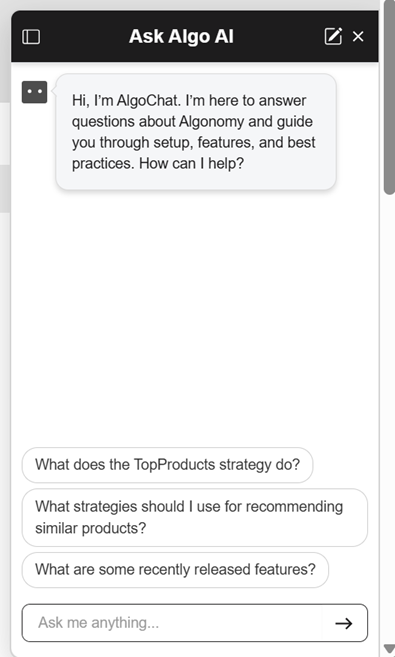
A new Helper Chatbot, titled “Ask Algo AI,” has been added to the dashboard to assist users with navigating and using ADA’s features. The helper introduces itself as AlgoChat and provides instant guidance on setup, features, and best practices.
Users can interact with the chatbot through suggested prompts such as “What does the TopProducts strategy do?” or type their own questions in the “Ask me anything...” field. This enhancement makes it easier for users to find information quickly and get real-time assistance directly within the platform.
Jira: ENG-31326
Other Feature Enhancements
The following feature enhancements and upgrades have been made in the release version 25.23.
|
Jira # |
Module/Title |
Summary |
General Availability |
|---|---|---|---|
|
Find: Improved Handling of Invalid Records in Query Vector Publisher Job |
The Query Vector Publisher job has been enhanced to handle invalid records in the query vector file more effectively. When encountering bad records—such as those introduced by accented query data—the system now logs the invalid entries and continues processing the remaining valid ones. |
13-Nov-25 |
|
|
Find: Enhanced Error Handling in Query Write and Query Vector Jobs |
Enhanced Error Handling in Query Write and Query Vector Jobs The Query Write and Query Vector jobs have been improved to prevent failures caused by malformed query data. The update removes backslashes from queries during the write process and introduces better exception handling in the vector job to log failed queries instead of stopping execution. |
13-Nov-25 |
|
|
Find: Reversion of Character Accent Normalization in Hybrid Search |
The previous change that normalized character accents during hybrid search has been reverted. Since accented queries are now properly stored in MongoDB and used for query vector generation, normalization is no longer required. |
13-Nov-25 |
|
|
Data Engineering: Improved Error Handling for Experience Browser Report APIs |
The Experience Browser report APIs have been updated to return cleaner and more accurate responses. When no data is available for a requested placement, the APIs now return an empty response or a proper error code instead of an HTML error page. |
13-Nov-25 |
|
|
Platform: Compatibility Enhancement for Mobile Phones and Accessories |
Compatibility processing now supports mobile phones and related accessories like cases and screen protectors. The system matches products by model names across defined categories, ensuring accurate pairing and more relevant recommendations. |
13-Nov-25 |
|
|
Enterprise Dashboard: URL Validation Settings Added to Site Configuration Page |
The customer-facing Site Configuration page now includes options to manage URL validation. Users can enable click-through URL validation and define whitelisted domain names directly from the interface. This enhancement allows self-service control over redirect validation, helping prevent unsafe redirects and improving overall site security. |
13-Nov-25 |
|
|
Recommend: Unencoded Image URLs for Category Recommendations |
The imageURL for category recommendations is no longer encoded in API responses. This update ensures consistency with product image URLs across both recsForPlacements and p13n_generated.js, making integration simpler and preventing display issues for client implementations. |
13-Nov-25 |
|
|
Recommend: Click Logging on URL Redirect Validation Failure |
Click events are now tracked even when URL redirect validation fails. This ensures that all user interactions are logged and included in reporting, maintaining accurate engagement data even if a redirect URL is invalid. |
13-Nov-25 |
|
|
Recommend: Increased Character Limit for Link URL Pattern |
The database character limit for the link URL pattern in Site Configuration has been increased from 255 to 400 characters. This allows support for longer URLs with multiple click-through parameters, ensuring compatibility with complex tracking and marketing link structures. |
13-Nov-25 |
|
|
Platform: Enhanced Airflow Scripts to Support Backfill Processing |
The Omnichannel Airflow scripts have been enhanced to include flexible backfill support while maintaining existing functionality. The update allows manual backfill runs with configurable date ranges and site IDs, ensures multi-file processing for regular feeds, and handles historical feeds gracefully when no new files are found. |
13-Nov-25 |
|
|
Social Proof: Improved Handling for Missing Session or User IDs |
The Social Proof Messages API now creates a temporary session ID when session or user IDs are missing, ensuring events are still tracked for reporting and optimization. This applies only when the MVT seed type is not sessionId; otherwise, behavior remains unchanged. |
13-Nov-25 |
|
|
Social Proof: Configuration to Enable or Disable Unique User Count Processing |
A new configuration has been added to control whether unique user count processing is enabled for Social Proof. By default, both user count and event count were processed, which increased resource usage. With this enhancement, teams can now choose to disable unique user count processing and rely solely on event count when needed. This feature is especially useful for clients or demo environments that only require event-level insights. It helps optimize system performance by reducing unnecessary processing load, making Social Proof more efficient and flexible for different use cases. |
13-Nov-25 |
|
|
Platform: Support for Shared Partition Assignment for New Sites |
A new service now allows assigning shared partitions to newly onboarded sites, such as Shopify sites. The API assigns an available shared partition while preserving existing site-to-partition mappings. Once assigned, the system automatically updates partition data, ensuring smooth onboarding without requiring manual intervention. |
13-Nov-25 |
|
|
Engage: Segmentation Evaluation Job Updated to Skip Old Key Prefix Rows |
The Segmentation Evaluation job has been enhanced to skip rows with outdated key prefixes in the segmentation profiles table. This ensures that only records with the corrected key prefix are processed, improving data accuracy and job performance. |
13-Nov-25 |
|
|
Platform: Unified API for Creating and Publishing External Credentials |
The external API admin service now provides a unified API to create and publish new credentials. This improvement streamlines credential management across environments, simplifying setup and ensuring consistency when generating client IDs and secrets. |
13-Nov-25 |
|
|
Sales Assistant Chatbot: Improved Message for No Response Scenario
|
The Chatbot now displays a friendlier message when a response cannot be generated, replacing “no response” with “Oops, something went wrong. Try your question again.” If the issue occurs within three seconds, the system automatically retries the query once to maintain user engagement and a smoother chat experience. |
13-Nov-25 |
|
|
Sales Assistant Chatbot: Enhanced Click Tracking and Endpoint Support |
The Chatbot UI has been updated to include additional parameters for improved click tracking and personalization. These parameters now capture details such as user ID, region, language, and currency in the /get API call. Click tracking now uses the sendBeacon method for more reliable data collection, ensuring accurate tracking and smoother performance across sessions. |
13-Nov-25 |
|
|
Chatbot Configuration: Product Exclusion Controls Added to LLMConfiguration Page |
A new set of controls has been added to the LLMConfiguration page to help teams manage which products appear in chatbot responses. Users can now exclude specific categories, brands, or attribute-value combinations, ensuring that unwanted products are not included in the catalog used by Chat. |
13-Nov-25 |
|
|
Helper Chatbot: Log User Names Instead of Account IDs |
The Helper Chatbot now logs the dashboard user’s first and last name instead of their account ID in LangChain. This enhancement improves visibility and traceability, making it easier to identify and manage chatbot usage across users. |
13-Nov-25 |
|
|
Platform: Recs and PS Catalog Job Scheduling Enhancement |
A new subscribeTo parameter has been added to the site-clone API, allowing Recs and Prop Store Catalog jobs to be scheduled automatically during connector site creation. When job names are provided, the cloned site is added to those schedules immediately. |
13-Nov-25 |
Bug and Support Fixes
The following issues have been fixed in the release version 25.23.
|
Jira # |
Module/Title |
Summary |
General Availability |
|---|---|---|---|
|
User Profile: UI Update for Historical Segments Display on User Profile Page |
The Segments and Historical Segments tabs on the User Profile page were not displaying correctly for sites without the Historical Segments configuration enabled. The Segments tab appeared empty, and the Historical Segments tab listed all segments, causing confusion. The logic has been updated to correctly display active and historical segments with proper labeling, timestamps, and links. |
13-Nov-25 |
|
|
Find: Portal Language Display Issue for Solar Sites |
An issue preventing multiple languages from appearing in the portal for certain sites has been resolved. The system now correctly retrieves all configured languages, including Swedish(sv), Danish(da), and Dutch(nl), by using the appropriate indexing type in the language service API. |
13-Nov-25 |
|
|
Social Proof: Social Proof Preview Not Working |
An issue preventing the Social Proof preview from loading for recent experiences has been fixed. The preview now functions correctly without showing the “experience not found” error. |
13-Nov-25 |
|
|
Find: Query Embedding Job Failure Due to NULL Enrichment |
The query embedding job was failing when encountering NULL values in the enrichment column. The job logic has been updated to skip such records instead of failing, ensuring smooth execution even when invalid enrichment data is present. |
13-Nov-25 |
|
|
Helper Chatbot: Prompt Refinement for AlgoChat System |
The AlgoChat (Helper Chatbot) system prompt was updated for greater precision and stricter adherence to documentation-based responses. The refined prompt enforces clearer rules for citation, factual accuracy, and response formatting, ensuring all answers remain fully grounded in verified sources.
|
13-Nov-25 |
|
|
Enterprise Dashboard: Test Drive User ID Field Not Updating |
The User ID field in Test Drive was not allowing edits after an initial value was set, preventing new User IDs from being saved. The issue has been corrected, and users can now successfully update and save new User IDs even for imported setups. |
13-Nov-25 |
|
|
Find: Package Plugin Compatibility with Hybrid Search |
An error occurred when running hybrid search with the package filter, causing the query to fail during execution. The underlying compatibility issue between the package parser and hybrid search was addressed, ensuring that all related B2B functionality, including package-based queries, now works as expected. |
13-Nov-25 |
|
|
Recommend: Manual Rule with Backfill Not Working |
A configuration issue caused backfill strategies not to return results for certain placements. Even though the backfill strategy was correctly identified, it wasn’t included in the final response due to improper sequence handling during processing. The logic has been corrected, and backfill recommendations now display as expected. |
13-Nov-25 |
|
|
Recommend: “Don’t Recommend Cart Items” Filter Applied Incorrectly to User Cart Model |
The user cart model failed to return results unless system and user rules were excluded. This occurred because the “Don’t Recommend Cart Items” filter, which prevents showing items already in the cart, was incorrectly applied to the User Cart model. The filter has now been excluded for this model, ensuring cart recommendations display correctly. |
13-Nov-25 |